
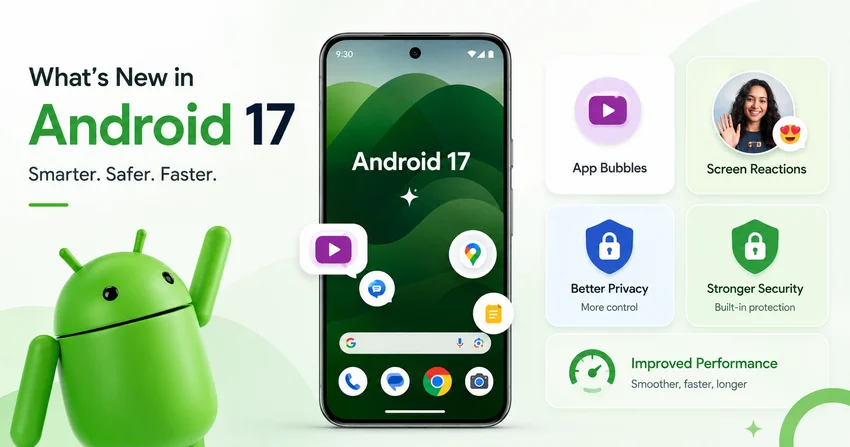
Meta Description: Discover what’s new in Android 17, including floating app Bubbles, Screen Reactions, foldable gaming, stronger privacy controls, improved performance and advanced camera features.
Google officially released Android 17 on June 16, 2026, beginning its rollout to supported Google Pixel devices. Other eligible Android smartphones, tablets and foldable devices are expected to receive the update throughout 2026, depending on their manufacturer and region.
Rather than completely redesigning Android, the latest version focuses on making everyday tasks faster and more flexible. Android 17 brings major improvements to multitasking, content creation, privacy, security, gaming and large-screen experiences.
1. Multitasking Gets Better with App Bubbles
One of the biggest additions in Android 17 is the expansion of Bubbles.
Previously, floating bubbles were mainly used for messaging conversations. Android 17 allows users to turn almost any supported app into a compact floating window by pressing and holding its app icon.
The bubble remains visible above other applications, allowing users to quickly open notes, maps, videos, sports updates or other useful information without constantly switching between full-screen apps.
On tablets and foldable devices, Android 17 also introduces a dedicated Bubble Bar. It provides a convenient place to organise, resize, maximise and switch between floating applications. Desktop-style Android environments receive interactive Picture-in-Picture windows that remain usable while displayed above other apps.
2. Screen Reactions Make Content Creation Easier
Android 17 introduces Screen Reactions, an improved screen-recording experience designed for tutorials, commentary and reaction videos.
Users can record their phone screen and capture themselves through the front-facing camera at the same time. This makes it easier to explain an app, react to a video, review a website or create educational content without needing a separate editing application or green-screen setup.
Google has also redesigned the screen-recording and annotation controls with a more accessible toolbar and a smoother recording process.
3. A New Gaming Mode for Foldable Phones
Foldable-device users receive a specialised gaming experience in Android 17.
The new foldable gaming mode can divide the screen into a 50/50 layout. The upper section displays the game, while the lower section can show a dynamic virtual game controller.
This arrangement allows players to enjoy a clearer view of the game without touchscreen controls covering important parts of the display. Availability may depend on the foldable device, game and manufacturer implementation.
4. Temporary Precise-Location Access
Privacy is one of the central themes of Android 17.
Applications can now request temporary access to a user’s precise location for the current session instead of receiving permanent permission. For example, an app may access an exact location while the user completes a task but lose that access after the session ends.
This gives users more control over when and how applications can view their location.
5. Share Selected Contacts Instead of Your Entire Address Book
Android 17 introduces a system-level Contact Picker that lets users choose exactly which contact details they want to share with an application.
Instead of granting an app access to the entire contact list, users can select a particular person, phone number or email address. The app receives only the information selected by the user.
This is especially useful for messaging, payment, delivery and social applications that only need access to one or two contacts rather than a complete address book.
6. Stronger Protection for Lost or Stolen Phones
Android 17 improves the “Mark as lost” feature available through Google’s Find Hub.
Users can protect a missing phone using biometric authentication. According to Google, this helps prevent someone who knows or has seen the phone’s passcode from accessing personal information or disabling tracking.
Android 17 also expands platform-level security protections, including improved one-time-password safeguards, stricter local-network access and stronger protections for sensitive information entered through physical keyboards.
7. Better SMS Verification-Code Protection
Android 17 strengthens the protection of one-time passwords received through SMS.
The system can delay access to verification-code messages for applications that are not the intended recipient. This makes it more difficult for an unrelated or malicious app to immediately read a security code used for account sign-ins, payments or identity verification.
Default messaging, assistant and approved companion applications may be treated differently under these protections.
8. Improved Performance and Memory Management
Android 17 introduces stricter memory limits based on the total RAM available on a device.
Applications that consume excessive memory may be restricted or closed by the system. Although this change primarily affects developers, users may benefit from smoother multitasking, fewer slowdowns and better control of battery-intensive applications.
Android 17 also introduces a lock-free MessageQueue architecture for applications targeting API level 37. Google says this can help reduce missed frames, improve application startup times and improve performance in busy, multithreaded applications.
9. More Powerful Camera and Video Features
Android 17 brings several improvements for professional camera, editing and media applications.
The platform adds support for the RAW14 image format, allowing compatible camera sensors and applications to capture greater detail and colour depth. It also introduces vendor-defined camera extensions, giving manufacturers more flexibility to provide their specialised camera modes to supported apps.
Android 17 adds support for Eclipsa Video, an HDR video format designed to adapt content according to display capability and surrounding light. The platform also includes improvements for video encoding, voice-message audio quality and compatible H.266 video implementations.
These technologies may not appear as obvious new buttons immediately. Their impact will become more noticeable as device manufacturers and app developers begin supporting them.
10. Expanded Parental Controls
Android 17 expands Android’s built-in parental controls beyond Pixel phones to other devices that receive the update.
Parents can manage daily screen time, create downtime schedules, set Google Play content filters, limit individual applications or block selected apps completely. The controls are available inside Android Settings and can be protected with a PIN.
Google Family Link remains available for additional features such as purchase approvals, location alerts and School Time controls.
11. More Home-Screen and Display Customisation
Android 17 includes several smaller personalisation improvements.
Users can hide application names from the home screen for a cleaner layout. The update also provides additional control over Android’s expanded dark theme and introduces a separate volume control for supported digital-assistant experiences.
The exact appearance and availability of these controls may vary between Google Pixel phones and devices using customised interfaces from manufacturers such as Samsung, Xiaomi, OnePlus or OPPO.
12. Better Experiences on Tablets and Large Screens
Android 17 continues Google’s move toward an adaptive-first operating system.
Applications targeting Android 17 are expected to work more effectively across phones, tablets, foldables, connected displays and desktop-style windows. On large screens, the system places greater emphasis on resizable applications rather than forcing users into a fixed orientation or layout.
This change should gradually result in more applications making proper use of tablet and foldable displays instead of appearing as enlarged phone apps surrounded by unused space.
Which Phones Will Receive Android 17?
Android 17 launched first on most supported Google Pixel devices. Google has also confirmed Android 17 testing or beta participation from manufacturers including Honor, iQOO, Lenovo, OnePlus, OPPO, Realme, Sharp, Vivo and Xiaomi.
The final update schedule for each phone will depend on its manufacturer, model, region and software-support policy. Samsung and other manufacturers may also incorporate Android 17 into their own customised operating-system updates.
Final Thoughts
Android 17 is an important update focused on practical improvements rather than visual change alone.
App Bubbles and Screen Reactions make multitasking and content creation easier, while temporary permissions, selective contact sharing and improved lost-device protection give users more control over their personal information.
The update also prepares Android for a future centred on foldable devices, tablets, desktop-style computing, professional content creation and deeper AI-assisted application experiences.
For most users, the most noticeable Android 17 features will be improved multitasking, stronger privacy controls, expanded parental controls and a smoother experience across different screen sizes.