
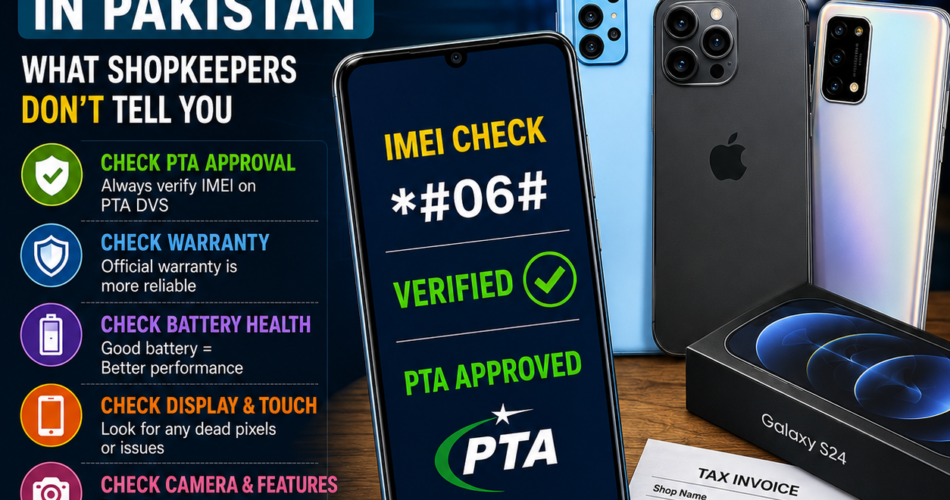
Buying a mobile phone in Pakistan looks simple. You visit a shop, ask for the latest model, compare the price, and make the payment. But in reality, many customers lose money because they do not know what to check before buying a phone.
This mobile phone buying guide in Pakistan will help you understand the hidden things shopkeepers usually do not tell you. Whether you are buying a brand-new phone, used phone, PTA-approved phone, or imported device, this guide will help you make a smarter and safer decision.
Why You Need a Mobile Phone Buying Guide in Pakistan
The mobile phone market in Pakistan is full of options. You can find official warranty phones, non-warranty phones, PTA-approved phones, JV phones, kit phones, refurbished phones, and imported phones. The problem is that many buyers do not fully understand the difference between these categories.
Some shopkeepers may only focus on selling the phone quickly. They may not clearly explain PTA status, warranty conditions, repair history, battery health, display replacement, or whether the device has been opened before.
That is why customers should never buy a mobile phone only by looking at the price. A cheap phone can become expensive later if it has PTA issues, weak battery, fake accessories, or no proper warranty.
1. Always Check PTA Approval Before Buying
In Pakistan, PTA approval is one of the most important things to check before buying a mobile phone. A phone that is not approved may stop working with local SIM networks after a certain period.
Before making payment, ask the shopkeeper for the phone’s IMEI number. You can dial:
*#06#
This will show the IMEI number of the device. If the phone has two SIM slots, check both IMEI numbers.
After that, verify the IMEI through PTA’s Device Verification System. You can check the status by sending the IMEI number to 8484, using the PTA DVS website, or using PTA’s official verification system.
Never trust only the shopkeeper’s words. Always verify the IMEI yourself.
2. Understand the Difference Between PTA Approved and Non-PTA Phones
Many customers get confused between PTA-approved and non-PTA phones. A PTA-approved phone means the device is registered and allowed to work on Pakistani mobile networks.
A non-PTA phone may be cheaper, but it can become useless for SIM calling, mobile data, and SMS after the allowed usage period. Some people buy non-PTA phones only for Wi-Fi use, but for daily use, PTA approval is very important.
Before buying, clearly ask:
“Is this phone PTA approved on both IMEIs?”
This is especially important for dual SIM phones. Sometimes one IMEI is approved and the second one is not. Always check both.
3. Do Not Fall for “Almost New” Without Testing
Shopkeepers often use words like:
- Fresh piece
- Like new
- Box pack condition
- Minor used
- Only few days used
- Imported set
- Just open box
These words sound attractive, but they do not prove the actual condition of the phone. A phone can look clean from the outside but still have battery issues, repaired display, weak charging port, water damage, or replaced parts.
Before buying any used phone, check it carefully. Do not rush because the shopkeeper says, “Sir, this is the last piece.”
4. Check Battery Health and Charging Carefully
Battery condition is one of the biggest hidden issues in used mobile phones. A phone may look excellent, but if the battery is weak, you will face fast draining, overheating, slow charging, and sudden shutdowns.
For iPhones, check battery health from settings. For Android phones, observe charging speed, battery drain, heating, and screen-on time. Also check whether the phone charges properly with the original or good-quality charger.
Avoid phones that heat up too much during normal use. Heating can be a sign of battery, board, or software issues.
5. Check Display Quality Before Payment
Display replacement is common in used phones. Some sellers may not clearly tell you if the screen has been changed.
Before buying, check:
- Brightness level
- Touch response
- Dead pixels
- Color quality
- Black spots
- Screen bleeding
- Fingerprint sensor
- Face unlock
- True Tone on iPhone
- Always-on display, if available
Open a white image and then a black image to check display problems. Also test the touch by typing fast on the keyboard.
A replaced display may reduce the resale value of the phone.
6. Test Cameras Properly
Many people only open the camera for a few seconds and think everything is fine. That is a mistake.
Test the front camera, back camera, portrait mode, video recording, flash, zoom, ultra-wide lens, and focus. Also check whether the camera shakes or makes noise. On some used phones, camera focus problems appear only when you record video or take close-up photos.
Take a few pictures in normal light and low light before finalizing the deal.
7. Check the Phone’s Storage and RAM Honestly
Some buyers choose a phone only because it has a famous brand name. But storage and RAM matter a lot in daily performance.
For normal users, 128GB storage is usually better than 64GB because apps, photos, videos, and WhatsApp data take a lot of space. If you are buying an Android phone, also check whether it has actual RAM or virtual RAM marketing.
Do not buy a phone only because the shopkeeper says it is “fast.” Check the processor, storage type, RAM, and software support.
8. Ask About Official Warranty
A phone with official warranty is usually safer than a phone with only shop warranty. Official warranty means the brand or authorized service provider may handle manufacturing faults according to warranty terms.
Shop warranty is different. It usually depends on the shopkeeper, and the terms may not be clear. Some shopkeepers give “checking warranty” for only a few days. That does not mean full protection.
Before buying, ask:
- Is this official warranty or shop warranty?
- How many months of warranty are left?
- What does the warranty cover?
- Is the warranty claimable in Pakistan?
- Do I need the original box and invoice for warranty?
Always take a proper invoice with IMEI number written on it.
9. Beware of Fake Accessories
Many phones are sold with fake chargers, fake cables, and low-quality handsfree accessories. Poor accessories can damage your phone’s battery or charging port.
If the phone comes with accessories, check their quality. For expensive phones, especially iPhones and flagship Android phones, original accessories may not be included. Do not pay extra unless you are sure the accessory is genuine.
A common trick is to sell the phone at a slightly lower price and then make extra profit through fake accessories.
10. Check If the Phone Has Been Opened or Repaired
A repaired phone is not always bad, but the buyer should know the truth. The problem starts when a repaired phone is sold as untouched.
Check the screws, edges, camera glass, back panel, SIM tray, and display fitting. If there are marks near the frame or uneven gaps, the phone may have been opened.
Also check:
- Face ID or fingerprint sensor
- Speaker quality
- Microphone
- Charging port
- SIM signals
- Wi-Fi
- Bluetooth
- Vibration
- Proximity sensor
If any of these features are not working properly, avoid the phone or negotiate the price accordingly.
11. Avoid Phones With Suspiciously Low Prices
If a mobile phone is much cheaper than the market rate, there is usually a reason. It may be non-PTA, repaired, locked, stolen, refurbished, water-damaged, or without warranty.
Always compare prices from multiple shops and online platforms before buying. A small discount is normal, but a huge price difference should make you careful.
Remember, the cheapest phone is not always the best deal.
12. Be Careful With JV, Locked, and Imported Phones
In Pakistan, you may hear terms like JV phone, factory unlocked, carrier locked, imported set, or patched device. Many buyers do not understand these terms and later face problems.
A locked phone may not work properly with Pakistani SIMs. A patched phone may have software changes that can create future issues. An imported phone may not have local warranty or PTA approval.
Before buying, ask the shopkeeper to explain the phone’s status clearly. If you do not understand the answer, do not buy immediately.
13. Check Software Updates and Android/iOS Version
Software updates are important for security, performance, and app compatibility. Some old phones may look good but no longer receive important updates.
Before buying, check the current software version and whether the model still receives updates. This is especially important if you plan to use the phone for banking apps, business communication, online classes, or long-term usage.
A phone with outdated software may become slow and less secure over time.
14. Test SIM, Calls, and Mobile Data
Do not buy a phone without inserting your own SIM. Check whether the phone catches signals properly. Make a call, receive a call, send a message, and test mobile data.
Also test both SIM slots if the phone is dual SIM. Sometimes one SIM slot works and the other does not.
This simple test can save you from serious trouble later.
15. Check the Invoice and IMEI on the Bill
A proper invoice protects you if there is a dispute later. The bill should include:
- Shop name
- Date of purchase
- Phone model
- Storage variant
- Color
- IMEI number
- PTA status
- Warranty details
- Paid amount
- Shop stamp or signature
Never accept a vague handwritten bill without IMEI details. If the shopkeeper refuses to write the IMEI number on the invoice, that is a red flag.
16. Do Not Pay Before Final Testing
Some shopkeepers try to close the deal quickly. They may say the phone is already checked or that testing is not needed. As a customer, you have the right to inspect the phone before payment.
Take at least 10 to 15 minutes to test the device properly. If the shopkeeper does not allow proper checking, buy from another shop.
A good seller will never stop you from checking the phone.
17. Online Buying: Extra Safety Tips
If you are buying a mobile phone online in Pakistan, be even more careful. Many fake sellers use attractive prices to trap customers.
Before ordering online:
- Check seller reviews
- Ask for real photos and videos
- Ask for IMEI number
- Verify PTA status
- Avoid advance payment to unknown sellers
- Prefer cash on delivery when possible
- Meet in a safe public place for used phones
- Test the phone before handing over money
Do not trust only screenshots. Always verify the details yourself.
18. New Phone vs Used Phone: Which Is Better?
A new phone is better if you want peace of mind, warranty, clean battery health, and long-term usage. A used phone is better if you want higher specifications at a lower price.
However, used phones require more checking. If you do not know how to inspect a phone properly, take someone experienced with you.
For students, business owners, and daily users, a reliable mid-range new phone is often better than an old flagship with hidden issues.
19. Best Things to Check Before Buying a Mobile Phone in Pakistan
Here is a quick checklist:
- PTA approval
- IMEI verification
- Official warranty
- Battery health
- Display condition
- Camera quality
- Charging port
- Speaker and microphone
- SIM signals
- Wi-Fi and Bluetooth
- Face ID or fingerprint
- Software version
- Repair history
- Original invoice
- Market price comparison
Do not skip these checks, especially when buying a used or imported phone.
20. Final Advice: Buy Smart, Not Fast
A mobile phone is not a small purchase anymore. Prices in Pakistan are high, and one wrong decision can cost you thousands of rupees. Shopkeepers may not always tell you every detail, so you need to protect yourself with knowledge.
This mobile phone buying guide in Pakistan is designed to help you avoid common mistakes and make a confident purchase. Always check PTA approval, verify IMEI, test the device properly, confirm warranty, and take a proper invoice.
The best phone is not always the most expensive one. The best phone is the one that is genuine, reliable, PTA-approved, and suitable for your needs.
FAQs About Buying Mobile Phones in Pakistan
How can I check if a mobile phone is PTA approved in Pakistan?
You can check the IMEI number by dialing *#06# on the phone and verifying it through PTA’s Device Verification System or by sending the IMEI number to 8484.
Is it safe to buy a non-PTA phone in Pakistan?
A non-PTA phone may be cheaper, but it may not work with Pakistani SIM networks after the allowed period. For regular use, a PTA-approved phone is safer.
What should I check before buying a used phone?
Check PTA status, IMEI, battery health, display, cameras, charging port, speakers, microphone, SIM signals, repair history, and invoice.
Is shop warranty the same as official warranty?
No. Official warranty is usually provided by the brand or authorized service provider, while shop warranty depends on the seller’s own terms.
Should I buy a used flagship or a new mid-range phone?
If you want reliability and warranty, a new mid-range phone is often safer. If you want better performance at a lower price, a used flagship can be good, but only after proper checking.
Why is IMEI important when buying a phone?
IMEI is the unique identity number of a mobile phone. It helps verify PTA status and can also be useful if the phone is lost, stolen, or involved in a dispute.