
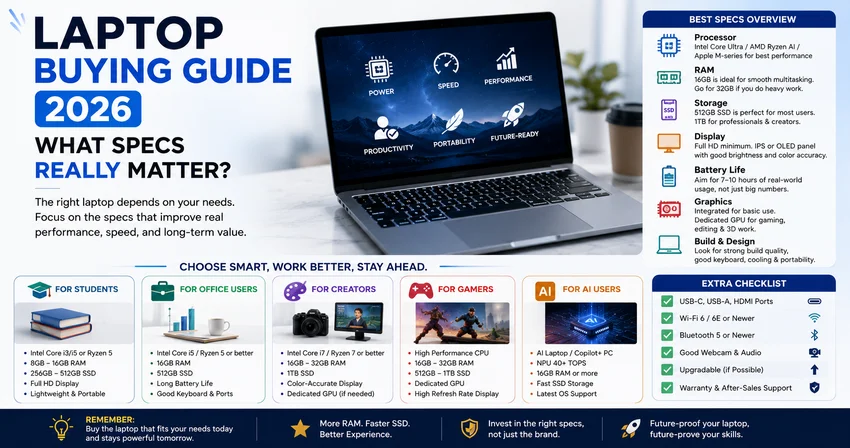
Buying a laptop in 2026 can be confusing because every brand talks about fast processors, AI features, high-resolution screens, long battery life, and premium designs. But not every specification matters equally. The right laptop depends on your actual use: study, office work, freelancing, gaming, editing, programming, or business.
This laptop buying guide explains the specs that really matter in 2026, so you can choose a laptop wisely without wasting money.
1. Processor: The Brain of the Laptop
The processor is one of the most important specs because it controls speed, multitasking, and overall performance. In 2026, look for newer-generation processors from Intel Core Ultra, AMD Ryzen AI, Apple M-series, or Snapdragon X series, depending on your budget and operating system preference.
For normal use like browsing, online classes, Microsoft Office, and YouTube, a mid-range processor is enough. But for video editing, coding, designing, gaming, or heavy multitasking, choose a stronger chip with better performance and efficiency.
If you want AI features, check whether the laptop has an NPU. Microsoft says Copilot+ PCs require an NPU capable of at least 40 TOPS, along with 16GB RAM, 256GB SSD, and Windows 11 version 24H2 or newer.
2. RAM: Do Not Go Too Low
RAM decides how smoothly your laptop handles multiple apps at the same time. In 2026, 8GB RAM is the bare minimum, but 16GB RAM is the better choice for most users.
Choose:
8GB RAM for basic student use
16GB RAM for office work, freelancing, coding, designing, and AI tools
32GB RAM for video editing, 3D work, heavy programming, and professional creative work
If your budget allows, go for 16GB because many modern apps, browsers, and AI tools need more memory.
3. Storage: SSD Is a Must
Never buy a laptop with only HDD storage in 2026. SSD storage makes the laptop faster when starting up, opening apps, copying files, and multitasking.
Recommended storage:
256GB SSD for basic users
512GB SSD for students, office users, and freelancers
1TB SSD for editors, designers, gamers, and professionals
A laptop with a smaller SSD may feel limiting after installing software, saving projects, and storing media files.
4. Display: More Than Just Size
A good display matters if you study, design, watch content, edit videos, or work long hours. For most users, a Full HD display is the minimum. If you do creative work, choose a screen with better color accuracy and higher brightness.
Look for:
Full HD or higher resolution
IPS or OLED panel
Good brightness
Anti-glare coating
100% sRGB for design work
120Hz or higher refresh rate for gaming
Microsoft’s laptop buying guide also highlights FHD, QHD, and 4K displays as important options depending on your use case.
5. Battery Life: Do Not Trust Only the Number
Battery life is not only about battery size. It also depends on processor efficiency, screen resolution, brightness, software optimization, and your daily usage. A laptop with a large battery but inefficient hardware may still perform poorly.
For students and office users, aim for a laptop that gives at least 7 to 10 hours of real-world battery life. TechRadar notes that real battery performance depends on hardware efficiency, display type, resolution, brightness, and software optimization, not just watt-hour rating.
6. Graphics Card: Only Important for Some Users
Not everyone needs a dedicated graphics card. If you only use your laptop for browsing, assignments, office work, Netflix, or online meetings, integrated graphics are enough.
You need a dedicated GPU if you do:
Gaming
Video editing
3D rendering
Animation
Architecture work
AI model training
Professional design work
For normal users, spending extra on a gaming GPU is not necessary.
7. Build Quality and Keyboard
Many buyers ignore build quality, but it matters a lot. A laptop may have strong specs but feel cheap, heat up quickly, or have a poor keyboard.
Check:
Strong hinge
Comfortable keyboard
Good trackpad
Lightweight body
Proper cooling
Webcam quality
Enough ports
If you type a lot, do not compromise on keyboard comfort.
8. Ports and Connectivity
A good laptop should have useful ports. In 2026, USB-C is very important, especially for charging, display output, and fast data transfer.
Look for:
USB-C
USB-A
HDMI
Headphone jack
Wi-Fi 6 or newer
Bluetooth 5 or newer
SD card reader if you are a creator
A laptop with limited ports may force you to buy extra adapters.
9. Operating System and Software Support
For most users, Windows 11 is the common choice. Microsoft lists Windows 11 minimum requirements as a 1GHz or faster 2-core processor, 4GB RAM, 64GB storage, UEFI Secure Boot, TPM 2.0, and DirectX 12-compatible graphics.
However, minimum requirements are not the same as good performance. For a smooth experience in 2026, choose at least 16GB RAM and SSD storage.
Best Laptop Specs to Buy in 2026
For students:
Intel Core Ultra 5 / Ryzen 5 / Apple M-series, 16GB RAM, 512GB SSD, Full HD display
For office users:
Modern i5/Ryzen 5 or better, 16GB RAM, 512GB SSD, good battery life
For designers/editors:
i7/Ryzen 7 or better, 32GB RAM, 1TB SSD, color-accurate display, dedicated GPU if needed
For gamers:
Strong CPU, 16GB or 32GB RAM, dedicated GPU, high-refresh-rate display, good cooling
For AI-focused users:
Copilot+ PC or AI laptop with 40+ TOPS NPU, 16GB RAM or more, SSD storage, latest OS support
Final Verdict
In 2026, the most important laptop specs are processor, RAM, SSD, battery life, display quality, and build quality. Do not buy a laptop only because it has a popular brand name or a flashy design.
For most people, the safest choice is a laptop with a modern processor, 16GB RAM, 512GB SSD, Full HD or better display, good battery life, and strong build quality. If you need AI features, gaming, or editing power, then spend extra on an NPU, dedicated GPU, better screen, and more RAM.
A good laptop is not the one with the biggest numbers. It is the one that matches your work, your budget, and your future needs.